Disclosure: GodelGuide is an independent editorial resource. We earn a referral commission if you subscribe to Godel Terminal through our links. Your price is identical with or without our link. See our methodology for how we test.
Reviewed by the GodelGuide editorial team. Last verified: May 17, 2026. Reading time: ~21 minutes.
TL;DR: Who Godel Terminal Is and Isn’t For
Godel Terminal is a web-based financial terminal built by DL Software Inc. — a Delaware C-corp with a $7M funding stack backed by Naval Ravikant, Balaji Srinivasan, dao5, and Infinitum. It runs a command-line interface modeled on Bloomberg, ships real-time Nasdaq TotalView data, SEC filings via EDGAR, and an options chain at $118/month. There is no native mobile app, no broker order routing, and fixed-income coverage is shallow.
If you’re a swing trader, equity analyst, options trader, or a one-to-five-person fund that can’t justify Bloomberg’s $31,980-per-seat-per-year price tag, Godel is the strongest answer in the under-$200/month tier. If you trade muni bonds, need IB Chat, or want a polished mobile experience, this isn’t the tool.
At-a-Glance: Godel Terminal vs Bloomberg, Koyfin, TradingView
| Godel | Bloomberg | Koyfin | TradingView | |
|---|---|---|---|---|
| Monthly price | $118 | Contract only | $0–$299 | $0–$60 |
| Annual price | $996 | ~$31,980 | $0–$2,988 | $0–$720 |
| Real-time US equity data | Nasdaq TotalView (included) | Full institutional feeds | Paid tier only | Cboe BZX (~10% of vol) |
| SEC filings inline | Yes (EDGAR) | Yes | Yes | No |
| Options chains | Yes (with Greeks) | Yes | Limited | Yes |
| Charting engine | TradingView-powered | Proprietary | Proprietary | Best in class |
| Fundamentals depth | Solid | Best in class | Best in class | Light |
| Fixed income | Shallow | Best in class | Limited | None |
| Learning curve | Steep (CLI) | Steepest | Easy | Easiest |
| Mobile app | Browser only | BBG Anywhere | Web responsive | Native apps |
For the deep dives, see our Godel vs Bloomberg, Godel vs Koyfin, and Godel vs TradingView breakdowns.
What’s Changed Since Our Last Verification
Godel ships weekly on Mondays. The most relevant updates since the last refresh of this review:
- April 6, 2026 (v4.3.6): Delayed intraday data added for 30+ countries including China, Germany, Japan, India, France, Italy, South Korea, Mexico, Saudi Arabia. PMKT (Manifold prediction markets) removed after 24 days.
- March 13, 2026 (v4.3.3): CBOE products (VIX, SPX) moved to paid subscription gating. ORG, MARTIN, and NEJM commands retired.
- January 22, 2026: DL Software closed a $5M seed round led by Infinitum, graduating Godel from beta status.
We re-verify pricing, active commands, and changelog notes every Monday. If you spot something stale, contact us and we’ll patch it within 24 hours.
What Is Godel Terminal?
Godel Terminal is the product of DL Software Inc., a Delaware C-corp registered at 8 The Green, Dover, DE 19901, with operations in New York. The CTO is Ralph Holzmann, a former Twitter senior engineer. Martin Shkreli — known publicly for his hedge funds Elea Capital and MSMB, his pharmaceutical companies Retrophin and Turing, and a 2017 federal securities fraud conviction — is a co-founder. Most editorial coverage of Godel ignores Shkreli entirely or fixates on him; we treat him as one fact among many. For a deeper look at corporate structure, investor roster, and the founder’s history, see our safety and legitimacy page.
The funding stack matters because it speaks to durability. DL Software has raised $7M total — a $2M pre-seed in July 2024 led by dao5 with participation from Naval Ravikant, Balaji Srinivasan, Meltem Demirors, Evolve Ventures, and co-founders from Anduril, Rippling, Flexport, Intercom, Lambda, Replit, Ankr, and Akash. A $5M seed in January 2026 led by Infinitum with Flex Capital, dao5, and “many Godel users” participating. This is not a one-person shop running on hope. It’s a venture-backed product with a named technical leader and a credible investor base.
The product itself is a single-page web application. Open a browser, log in, hit the backtick key, and you’re in a command palette. Type a ticker, a space, a command — MSFT DES, AAPL G, NVDA OPT — and the relevant panel opens. The whole thing is designed to feel like Bloomberg without the Bloomberg keyboard, the Bloomberg contract, or the Bloomberg price tag.
How Much Does Godel Terminal Cost in 2026?
Pricing as of May 2026, verified directly on godelterminal.com:
- Free tier: $0. Limited entitlements. Some commands open the panel but show “subscription required” for live data. Run
ENTto see your current entitlements. - Pro monthly: $118/month.
- Pro annual: $996/year ($83/month effective — a 15% discount over monthly).
- FINRA surcharge: +$30/month, required only for FINRA-certified registered representatives. Most retail users do not need it.
- 14-day free trial: Card on file at signup. Per Godel’s Terms of Service, the subscription suspends at the end of the trial rather than auto-billing. You actively continue to be charged.
The honest math on first-month discounts: every “Godel discount code” on the internet (GUIDE, NEWUSER, GET30, SHKRELI, TAKE30, PROMO30, JERA, SAVEONTRADING) is a Rewardful affiliate referral token that gives the same 30% off the first month — bringing month one to $82.60. After that you’re at full $118. The annual plan at $83/month effective beats any monthly-plus-code combination after about nine months. Use the code if you’re still evaluating; go annual if you’re confident. We break the math down in our discount code page.
What It Feels Like to Use the Command-Line Interface
The first 30 minutes on Godel are disorienting if you’ve never used Bloomberg. The second 30 minutes are when it clicks.
The pattern is universal. Press the backtick key (`) from anywhere in the terminal to open the command palette. Type a ticker, a space, a command. Press Enter. The relevant panel opens. Some commands are global and take no ticker — MOST for the most active US equities, TOP for top financial news, WEI for world equity indices, HELP for the docs.
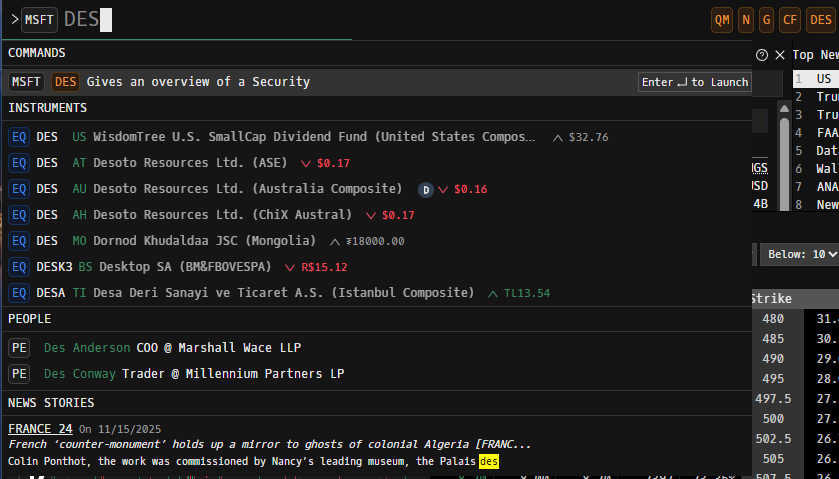
The syntax for international tickers requires an exchange code: UBI FP Equity DES opens the description page for Ubisoft on Euronext Paris. 7203 JP Equity G charts Toyota on the Tokyo exchange. This is the most common stumbling block for new users — Reddit threads about Godel are full of people asking why a ticker isn’t resolving, and the answer is almost always a missing asset-class qualifier.
The core commands every user learns in the first week: DES (security description and overview), G (chart), FA (financial statements), HDS (institutional holders), N (news), CF or SECF (SEC filings), OPT (options chain), TAS (time and sales). Everything else builds from there — our full commands reference guide walks through every active command in depth.
What makes this feel fast is the muscle-memory loop. You don’t navigate menus, you type. Three keystrokes opens a chart on any ticker globally. Compared to a web-based platform like Koyfin or Yahoo Finance — where every action is a click on something visual — the CLI is dramatically faster once your hands learn it. Bloomberg users will be at home in under an hour. Everyone else needs about a week of intentional practice.
Up to six independent workspace panels can run side by side. A typical setup we use: ticker description top-left, chart top-right, news bottom-left, financials bottom-right, with a Quote Monitor (QM) strip across the top tracking SPY, NVDA, QQQ, and whatever ticker is in focus.
How Does Godel Terminal’s Data Quality Compare?
This is where Godel earns its price point.
US equity data runs on Nasdaq TotalView — the full Nasdaq depth feed, not the truncated Cboe BZX feed that TradingView’s free tier ships. Cboe BZX is real-time but represents roughly 10% of US equity volume. For chart-watching it’s mostly fine; for tape reading, time-and-sales work, or any execution decision that depends on seeing actual institutional flow, BZX is a problem. TotalView shows the order book that institutions trade against. Godel includes it in the $118 base price.
News is the second strong moat. The N command on any S&P 500 ticker returns a denser news feed than Bloomberg’s web version, Koyfin, or any retail aggregator we compared in our workflow. Latency feels well under a second. Godel’s marketing claims “2× more news articles per ticker than any other provider, delivered in under 100 milliseconds” — we don’t have a benchmarked basis to confirm the specific 2× figure, but the directional claim of denser, faster news matches what we see in daily use.
SEC filings come direct from EDGAR with deep links back to the source. The CF or SECF command on any US ticker pulls every filing back to inception with one-click expansion of the actual filing PDF. No competitor at this price point matches this depth.
Charts are TradingView-powered, which is both a strength (best-in-class drawing tools, indicator library, charting feel) and a tell that Godel didn’t build everything in-house. The integration is clean — you don’t notice the seam — but power users who want TradingView’s full feature set will still feel the difference.
International coverage expanded dramatically in April 2026. Delayed intraday data is now available for 30+ countries including China, Germany, Japan, India, France, Italy, South Korea, Mexico, Saudi Arabia. Real-time intraday is available for US, London, Toronto, and Australia. For an international equity trader, this is a meaningful change — twelve months ago, Godel was a US-only product.
Our Pre-Market Research Workflow on MSFT in 8 Commands
The fastest way to understand whether Godel fits your workflow is to watch someone run an actual research sequence. Here’s the one we run most mornings on a single ticker before market open. Total time in our testing: about three minutes on a name we don’t know well, less on a name we do.
1. MSFT DES — Get the company in 30 seconds
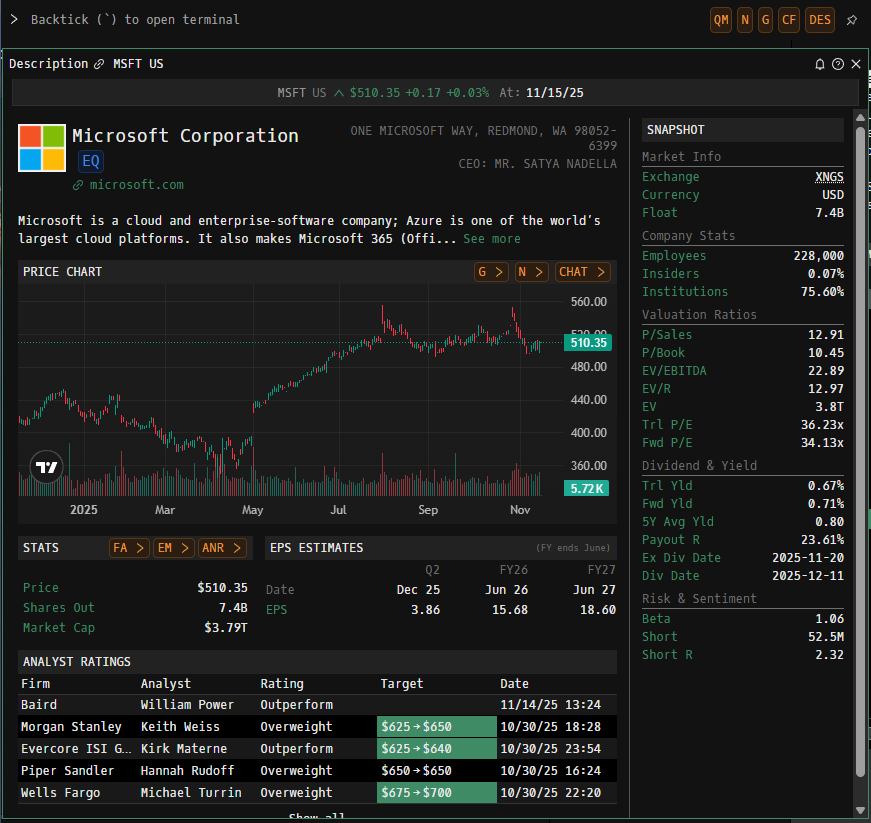
The DES command opens a full overview panel: business description, address, CEO, exchange, currency, employees, insider ownership, institutional ownership, valuation ratios (P/Sales, P/Book, EV/EBITDA, P/E trailing and forward), dividend yield, and the most recent EPS estimates. For Microsoft as of mid-May 2026 it returns the basic Azure/Microsoft 365 description, ~228,000 employees, ~75.6% institutional ownership, a 36.23x trailing P/E, and a recent analyst-target table on the right rail.
2. MSFT G — Pull up the chart
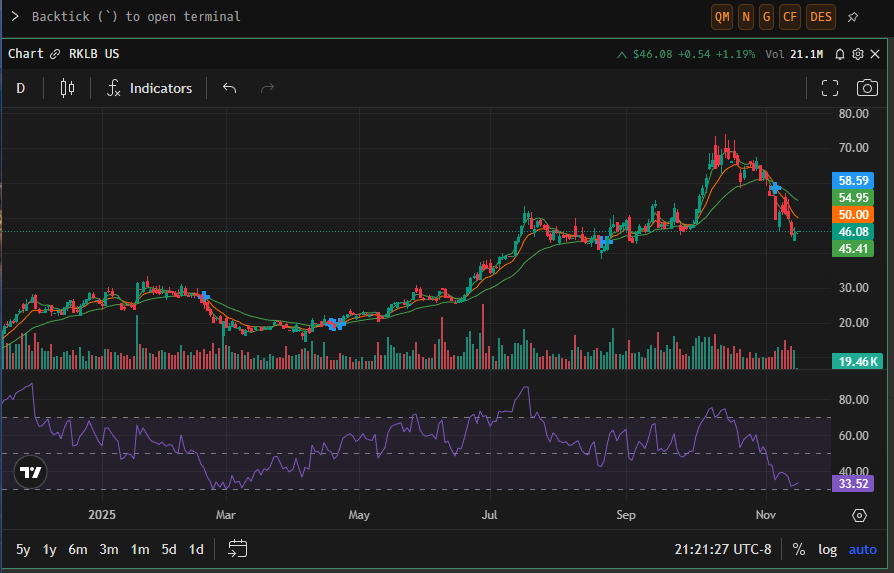
The G command opens the TradingView-powered chart. We typically flip immediately to a 1-year daily view to see the trend and check for recent gaps. D for daily, 5y / 1y / 6m / 3m / 1m / 5d / 1d are the standard timeframes.
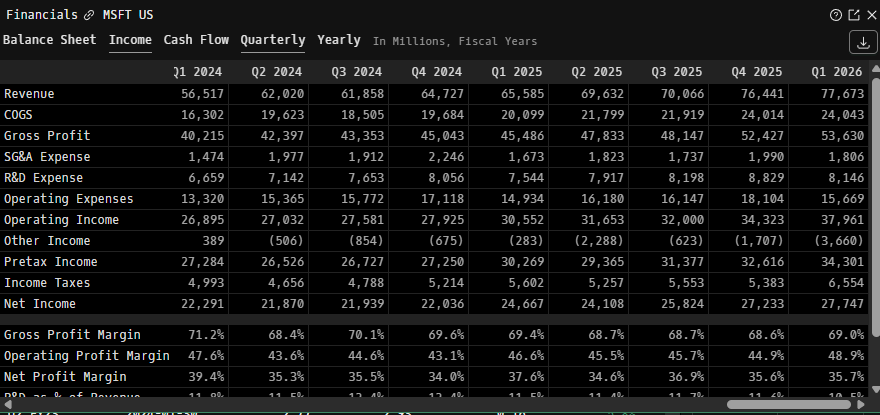
3. MSFT FA — Financial statements at a glance
The FA command opens income statement, balance sheet, and cash flow tabs side by side, quarterly and annual. Revenue, COGS, OpEx breakdown, net income — eight quarters and four fiscal years visible in one panel.
4. MSFT HDS — Who owns it
The HDS command lists all institutional holders by position size and most recent change. This is where you see whether a name is being accumulated or distributed by the big institutional buyers — same data you’d find on a 13F filing, surfaced in seconds.
5. MSFT N — Real-time and historical news
The N command opens the news feed filtered to the ticker. This is where the news-volume moat shows up — we typically see 20-40 articles in the last 24 hours on any S&P 500 name, with deeper coverage than any retail aggregator. Articles are clickable with full-text preview.
6. MSFT CF — Recent SEC filings
The CF command (or SECF) opens the EDGAR-sourced filings panel: 10-K, 10-Q, 8-K, Form 4 (insider transactions), proxy filings, and ownership filings. Each one expands to the full document. For a research workflow that includes reading actual filings, this is the time-saver that justifies the subscription on its own.
7. MSFT OPT — Options chain
The OPT command opens the options chain with Greeks (Delta, Gamma, Theta, Vega, Rho, Lambda, Epsilon), strike grid, expiration grid, calls and puts side by side, and an integrated Black-Scholes calculator via OVME. As of April 2026, the chain shows up to 100 strikes per expiration.
8. MSFT TAS — Time and sales for execution decisions
The TAS command opens the time-and-sales tape — every executed trade with timestamp, size, price, and exchange. This is the command that matters most for scalpers, tape readers, and anyone trying to detect block activity. Cboe BZX feeds can’t do this honestly; Nasdaq TotalView can.
The whole sequence — DES → G → FA → HDS → N → CF → OPT → TAS — takes about three minutes on a name we’ve never looked at before. Try the same workflow on Koyfin or TradingView and you’ll be clicking through menus for ten. That’s the speed argument.
What’s Good
Institutional data at retail price. Nasdaq TotalView at $118/month is the central value proposition. The same feed in an institutional package runs hundreds to thousands per month depending on enterprise terms. Godel’s pricing only works because the company aggregates retail subscribers against a wholesale data contract.
Command-line speed for power users. Once the muscle memory clicks, no GUI-based platform can match the pace. Three keystrokes to any panel on any ticker globally. The Quote Monitor command stays open across windows so you always have live prices on your watchlist.
TradingView charts inline. Charting was never going to be a Godel build — it’s a TradingView integration. The upside is best-in-class drawing tools and indicators without leaving the terminal.
SEC filings via EDGAR, surfaced fast. The CF command is the kind of feature you don’t realize you needed until you’ve had it. Reading 8-Ks within seconds of a release is a meaningful edge.
Options chain with full Greeks. Up to 100 strikes per expiration, Black-Scholes calculator built in, clean grid view. Better than free TradingView, better than Koyfin’s options coverage, and substantially cheaper than dedicated options platforms.
Weekly shipping cadence. Godel’s changelog shows weekly Monday updates since March 2026. For a small company, this is fast. Bugs get fixed; features get added; the product moves.
14-day trial that doesn’t auto-charge. Per Godel’s published Terms of Service, the subscription suspends at the end of the trial rather than auto-billing. Most SaaS trials silently auto-renew. Godel’s doesn’t.
What’s Not
Mobile is weak. The terminal runs in any modern browser, but it isn’t optimized for phones. Compared to Bloomberg Anywhere or TradingView’s native mobile apps, Godel on a phone is a stopgap. If your workflow requires real mobile parity, this isn’t there yet.
Learning curve is real. If you’ve never used Bloomberg, expect a week of intentional practice to feel fluent. The command palette is fast once you know the commands; it’s a wall when you don’t. Our cheat sheet helps; the in-app HELP command works; the official docs at docs.godelterminal.com are reasonable. But there’s no getting around the curve.
Retired and unstable commands. PMKT (Manifold prediction markets) shipped in March 2026 and was removed in April. ORG, MARTIN, and NEJM were retired in v4.3.3. EQS has been “under maintenance” since October 2025. The team ships fast, but that means some features have short lives. Don’t build a workflow around any single command you haven’t verified is currently active.
No native broker integration. The BROK command links to broker websites; it isn’t an order router. If you want one-screen research-and-trade flow, you’ll still need a separate broker platform open alongside Godel.
Fixed income depth is shallow. Marketing references “deep coverage across bonds,” but in practice there’s no CUSIP search, no muni-specific tooling, and no bond pricing screens comparable to Bloomberg. If you trade corporate debt or municipal bonds, Godel is not your tool.
No public API. Power users wanting programmatic access to Godel data won’t find it. If you need data feeds for a custom application, you need a different vendor.
Mixed third-party reputation signals. Godel’s Trustpilot page has two reviews, both critical — one alleges the founder gave informal investment guidance that led to a five-figure loss; another raises data accuracy concerns. SourceForge has a user review noting a bond-yield data bug that persisted for over a month and complaints about account moderation. Review volume is low across the board, and some of the criticism is colored by the company’s public association with a controversial founder. The signal is real but the data set is thin. We work through the full reputation picture, including the founder’s history, on our safety and legitimacy page — worth reading before you hand over a credit card.
Is Godel Terminal Worth It for Different Trader Types?
Is Godel Terminal worth it for swing traders?
Yes. The combination of Nasdaq TotalView, dense news, fast SEC filing access, and command-line speed is genuinely useful for a multi-day-hold trader running a focused watchlist. The annual plan at $83/month effective is competitive with a single TradingView Premium subscription ($60/month) when you factor in the data feed difference. If you’re swing trading US large-cap and you’re currently paying for TradingView, Koyfin, and a separate news source, Godel can consolidate that stack.
Is Godel Terminal good for fundamental analysis?
Mostly. The FA command, HDS institutional ownership, EDGAR filings access, and analyst-rating overlays cover the core of a fundamental research workflow. Where Godel falls short of Koyfin or Bloomberg is depth of comparable analysis and historical financial-statement granularity beyond 4-5 years. For a quick read-through of a name, Godel is fast. For a 50-comp screening exercise, Koyfin’s screening tools are better.
Is Godel Terminal good for options traders?
Yes, with caveats. The options chain (OPT) is solid — up to 100 strikes per expiration, full Greeks, integrated Black-Scholes via OVME. For pre-trade research and idea screening, it works. What it doesn’t do is execute trades or stream broker-grade IV surfaces with the depth of a dedicated options platform like ThinkOrSwim or Tastytrade. Use Godel for research, your broker platform for execution.
Who shouldn’t subscribe?
Long-term buy-and-hold investors checking quarterly. Fixed-income traders. Anyone whose workflow lives on a phone. People uncomfortable with the founder’s public history (the safety page goes deep on this — read it before paying).
Final Verdict
[INSERT CUSTOM HTML BLOCK 4 — Final Verdict Box]
Next steps depending on where you are: still deciding? Check our Bloomberg comparison or Koyfin comparison. Worried about handing over a credit card? Read the safety page. Want the cheapest path in? The discount code page walks through every active code and the annual-plan math.
Frequently Asked Questions
How much does Godel Terminal cost?
$118/month or $996/year (an effective $83/month) for the Pro tier. FINRA-certified registered representatives pay an additional $30/month surcharge. There is a free tier with limited entitlements and a 14-day Pro trial that does not auto-charge.
Is Godel Terminal a Bloomberg alternative?
For equity research, news, SEC filings, and options analysis at a small fund or for an individual trader — yes, meaningfully. Godel covers about 70% of a typical Bloomberg equity workflow at 0.3% of the price. It is not a full Bloomberg replacement for fixed income, IB Chat–based dealer messaging, or institutional multi-asset coverage.
Does Godel Terminal have a free trial?
Yes — 14 days, full Pro access. Per Godel’s published Terms of Service, the subscription suspends at the end of the trial rather than auto-billing. You must actively re-engage to be charged.
What is the Godel Terminal discount code?
GUIDE gives 30% off the first month, bringing month one to $82.60. Every other Godel discount code on the internet — NEWUSER, GET30, SHKRELI, TAKE30, PROMO30, JERA, SAVEONTRADING — is a Rewardful affiliate referral token that delivers the same 30% off. They’re functionally identical.
Who owns Godel Terminal?
Godel Terminal is operated by DL Software Inc., a Delaware C-corp. The CTO is Ralph Holzmann, a former Twitter senior engineer. Martin Shkreli is a co-founder. Investors include dao5, Infinitum, Naval Ravikant, Balaji Srinivasan, Meltem Demirors, and Evolve Ventures. Total funding raised is $7M across pre-seed (July 2024) and seed (January 2026) rounds.
Does Godel Terminal have a mobile app?
No native app. The terminal is web-based and runs in any modern browser including mobile browsers, but it isn’t optimized for phone-sized screens. This is one of Godel’s clearest weaknesses compared to Bloomberg Anywhere or TradingView’s mobile apps.
Can I trade through Godel Terminal?
No. Godel is a research, data, and analytics terminal — not a brokerage. The BROK command links to broker websites, but order execution must happen on a separate broker platform.
What data sources does Godel Terminal use?
Nasdaq for real-time US equity data including TotalView depth. TradingView for the charting engine. EDGAR for SEC filings (back to company inception with direct source links). Plus proprietary news aggregation, options chains, institutional ownership data, and analyst ratings.
Methodology: This review is based on multi-month hands-on use of Godel Terminal Pro by the GodelGuide editorial team. Pricing verified directly on godelterminal.com on May 17, 2026. Commands tested against the live product on the same date. Changelog cross-referenced through v4.3.6 (April 6, 2026). Corporate structure and funding facts pulled from PRNewswire press releases, godelterminal.com/news, and SEC-adjacent public filings. We re-verify this review every 90 days at minimum; pricing and command sections are checked weekly. If you find a stale fact, contact us and we’ll patch it within 24 hours. Full methodology: /methodology/.